Showing posts with label Knowledge. Show all posts

Sunday, November 27, 2016

Lowongan kerja : dibutuhkan CEPAT karyawan di OPPO SMARTPHONE

Lowongan kerja,dibutuhkan CEPAT karyawan di OPPO SMARTPHONE :

- SALES
- Promotor / Event

SALES
Syarat :
1. Pria
2. minimal pendidikan min D3 /S1
3. usia dibawah 27 tahun
4. Diutamakan berpengalaman di bidang gadget
5. Pandai berkomunikasi.
6. Berpenampilan Menarik.
7. Tertarik di dunia gadget.
8. Siap bekerja di bawah tekanan
9. Jujur, disiplin dan bertanggung jawab
10. Foto terbaru 4 x 6 @2 lembar

- Promotor / Event
Syarat :
1. Pria / wanita
2. minimal pendidikan min SMA
3. usia dibawah 25 tahun
4. Diutamakan berpengalaman di bidang gadget
5. Pandai berkomunikasi.
6. Berpenampilan Menarik.
7. Tertarik di dunia gadget.
8. Siap bekerja di bawah tekanan
9. Jujur, disiplin dan bertanggung jawab
10. Foto terbaru 4 x 6 @2 lembar

Kirim lamaran dan CV ke HRD OPPO SMARTPHONE (PT WORLD INNOVATIVE TELECOMMUNCATION ) cabang Pati/ kudus

Via Pos : Jl Diponegoro Ruko Grand puri Blok B1 pati  ( posisi yang ingin dilamar ditulis di pojok kanan atas amplop lamaran )
Via email : gionoppokudus@gmail.com ( posisi yang ingin dilamar ditulis di SUBJEK EMAIL )
Dibantu share yaa, thanks

Saturday, November 12, 2016

Lowongan kerja,dibutuhkan CEPAT karyawan di OPPO SMARTPHONE

Lowongan kerja,dibutuhkan CEPAT karyawan di OPPO SMARTPHONE :

- SALES
- Promotor / Event


SALES
Syarat :
1. Pria
2. minimal pendidikan min D3 /S1
3. usia dibawah 27 tahun
4. Diutamakan berpengalaman di bidang gadget
5. Pandai berkomunikasi.
6. Berpenampilan Menarik.
7. Tertarik di dunia gadget.
8. Siap bekerja di bawah tekanan
9. Jujur, disiplin dan bertanggung jawab
10. Foto terbaru 4 x 6 @2 lembar

- Promotor / Event
Syarat :
1. Pria / wanita
2. minimal pendidikan min SMA
3. usia dibawah 25 tahun
4. Diutamakan berpengalaman di bidang gadget
5. Pandai berkomunikasi.
6. Berpenampilan Menarik.
7. Tertarik di dunia gadget.
8. Siap bekerja di bawah tekanan
9. Jujur, disiplin dan bertanggung jawab
10. Foto terbaru 4 x 6 @2 lembar

Kirim lamaran dan CV ke HRD OPPO SMARTPHONE (PT WORLD INNOVATIVE TELECOMMUNCATION ) cabang Pati/ kudus

Via Pos : Jl Diponegoro Ruko Grand puri Blok B1 pati  ( posisi yang ingin dilamar ditulis di pojok kanan atas amplop lamaran )
Via email : gionoppokudus@gmail.com ( posisi yang ingin dilamar ditulis di SUBJEK EMAIL )
Dibantu share yaa, thanks
Tuesday, October 18, 2016

Lowongan kerja : dibutuhkan CEPAT karyawan di OPPO SMARTPHONE

Lowongan kerja : dibutuhkan CEPAT karyawan di OPPO SMARTPHONE :


- Event  (Jepara, Kudus)
- Promotor ( Kudus,Pati,Jepara)


Syarat :
1. Pria / wanita
2. minimal pendidikan min SMA
3. usia dibawah 25 tahun
4. Diutamakan berpengalaman di bidang gadget
5. Pandai berkomunikasi.
6. Berpenampilan Menarik.
7. Tertarik di dunia gadget.
8. Siap bekerja di bawah tekanan
9. Jujur, disiplin dan bertanggung jawab


Kirim lamaran dan CV ke HRD OPPO SMARTPHONE (PT WORLD INNOVATIVE TELECOMMUNCATION ) cabang Pati/ kudus

Via Pos : Jl Diponegoro Ruko Grand puri Blok B1 pati  ( posisi yang ingin dilamar ditulis di pojok kanan atas amplop lamaran )
Via email : gionoppokudus@gmail.com ( posisi yang ingin dilamar ditulis di SUBJEK EMAIL )

Monday, December 12, 2011

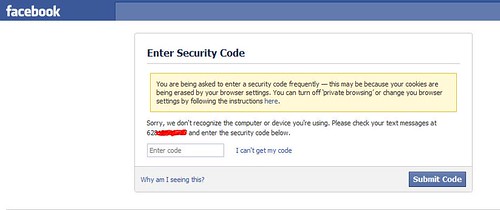
Facebook security code | Social Engineering

Facebook security code | Social Engineering:
I’ve activated some features in facebook related to the security issue. In this morning,  my cookies are being erased by my self. Then I’m trying log in to facebook. But there is a notification :

Facebook Security Code

Sunday, November 20, 2011

Marking Locations in Google Maps on Your Personal Web


After making a few days ago I wrote an article how to display the google map on our own personal website, now I'll write an article how to indicate a location on google map ours is. Marker. Yes, the name of the location marked on the google map marker commonly called. Generally the picture is the same markers as the picture next to it. But did not rule out the marker image is not the same as the picture beside.
Usually the use of these markers are used to indicate a position location information. Let's say, on my blog

Saturday, October 15, 2011

Pengertian Data Mining dan Konsep Dasar Data Mining

Pengertian Data Mining

Data Mining adalah Serangkaian proses untuk menggali nilai tambah berupa informasi yang selama ini tidak diketahui secara manual dari suatu basisdata dengan melakukan penggalian pola-pola dari data dengan tujuan untuk memanipulasi data menjadi informasi yang lebih berharga yang diperoleh dengan cara mengekstraksi dan mengenali pola yang penting atau menarik dari data yang terdapat dalam basisdata.
­ ­
Data mining biasa juga dikenal nama lain seperti : Knowledge discovery (mining) in databases (KDD),

Tuesday, January 18, 2011

Enabling SquirrelMail For Your Web Sites On An ISPConfig 3 Server (Debian Lenny)

Enabling SquirrelMail For Your Web Sites On An ISPConfig 3 Server (Debian Lenny): "


Lots of people have reported problems (such as getting 404 Not Found errors) using the SquirrelMail webmail package in their web sites created through ISPConfig 3. If you have followed the "Perfect Server" guides for ISPConfig 3,...

"

Say To Great !

Say To Great !: "

Okey sekarang apakah yg bisa anda rasakan ketika mendengar dari Apple inc yang selalu mengucapkan kata great? Itu adalah kata kunci sebagai penyemangat dalam team. Tetap Semangat dan Berkerja jangan Menyerah atau pun putus asa
"

Stop Permanent "Work Offline" di Mozilla Firerox

Stop Permanent "Work Offline" di Mozilla Firerox: "
Kadang ketika kita membuka firefox mincul Warning work offline. Salah satu cara yang kita lakukan untuk mengubah mode work offline adalah File-> WorkOffline. Setelahnya kita akan lancar berselancar di dunia maya. Trus, Ketika selesai berselancar kita membuka Firefox kembali maka warning work offline kembali muncul, maka kita akan melakukan hal yang  sama untuk membukanya agar dapat berselancar kembali. 


Sekarang kita akan mencoba membuat otomatis mode work offline sehingga mode work offline tidak lagi kita jumpai saat kita berselancar.


1. Buka browser dan ketikan alamat about:config
about:config Merupakan fasilitas tweeking pada browser firefox.

2. Klik kanan dan Pilih New->Boolean
Buat konfigurasi baru dengan cara klik kanan New->Boolean


3. Beri nama konfiguarasi baru dengan network.manage-offline-status
Beri nama konfigurasi baru dengan network.manage-offline-status

4. Set Nilai Menjadi false
Setelah Selesai memberi nama maka set nilainya menjadi false

5. Restart Firefox anda


SELAMAT MENCOBA
"

NEW STATS: Android 2.2 now on 52% of Android phones, while 2.3 only 0.4%

NEW STATS: Android 2.2 now on 52% of Android phones, while 2.3 only 0.4%: "

According to Google’s Android Developers, Android 2.2 now takes its place on 51.8% of phones that connected to the Android Market during the two weeks ending January 4, 2011, while 2.3 only 0.4%. At the end of last December, Google released the Android 2.3, but statistics indicate that there are still more Android 2.2 users, which probably because there are not many new mobile models for Android 2.3, and the handset manufacturers are not willing to update to this new version.


The change of the Android system version may reflect the average level of the user situations, mobile models and other relevant circumstances, which can be used as the relevant reference. The following are details of the above chart, the percentage of the market share data:


As can be seen from the above statistics, the flash feature of Android 2.2 draw a lot of active users to upgrade to the system version, mainly because most users are in favor of entertainment.  And the CyanogenMod team also contributes a lot, their ROM allow users to upgrade their system quickly through a third party, rather than waiting eagerly for the official final version.

"

Updated Google Translate for Android introduces Conversation Mode

Updated Google Translate for Android introduces Conversation Mode: "

As far as the first version for Google Translate for Android was released in January 2010, there have been several updates to make the app easy (easier) to work with. This time Google has updated it to 2.0 and added a new feature called “Conversation Mode.”


With Conversation Mode, you can now have a very convinient conversation with someone on your Android phone that does not speak the same language as you that means conversation mode allows you and your foreign friend to speak in two different languages before having Google Translate display the words you say onscreen in your native languages (as seen in the second screenshot above). Version 2.0 also includes an updated UI, which looks quite slick. It is in favor of 53 languages and works at least on Android 2.1. You can get it in Android Market

"

Google Acquires eBook Technologies

Google Acquires eBook Technologies: "


eBook Technologies has just published a brief announcement on its website which said that Google has just acquired eBook Technologies.The announcement reads:


“eBook Technologies, Inc. is excited to announce that we have been acquired by Google. Working together with Google will further our commitment to providing a first-class reading experience on emerging tablets, e-readers and other portable devices.”


 Google confirmed the acquisition, with a spokesperson giving us this statement:


“We are happy to welcome eBook Technologies’ team to Google. Together, we hope to deliver richer reading experiences on tablets, electronic readers and other portable devices.”


eBook Technologies supplies a series of intelligent reading devices and licenses technologies that enable automated publishing and control over content distribution. And the eBook Technologies, Inc. (“ETI”) platform consists of four parts: electronic reading devices (eBook devices) plus their associated UI firmware technology, the “Online Bookshelf”, an Internet-based content sales and delivery system (the eBookstore), and eBook content conversion / publication tools.


Now it’s unclear which of these technologies Google intends to use, but it could clearly take advantage of them to bolster its Google Books product, which recently launched its eBook store.

"

Hotspot VS Ubuntu lucid liynk

Hotspot VS Ubuntu lucid liynk: "


Hotspot dengan Chillispot + Freeradius + Phpmyprepaid

  1. Install linux ubuntu nya dulu

  2. Setelah selesai installasi login ke ubuntu seperti biasa.

  3. Biar bisa masuk ke root ketik “sudo su” (tanpa tanda kutip), kemudian masukin lagi passwordnya. Lihat perbedaannya. kalo user biasa ditandai dengan $ tapi kalo root ditandai dengan # .

  4. buat dulu password root nya dengan perintah

    • #passwd root

    • (buat password root sesuai keinginan)

    • (masukin password yang dibuat tadi sekali lagi)

  5. Edit konfigurasi untuk eth1 sebagai berikut

    • #nano /etc/network/interfaces

    • –isi tulisan ini bagian paling bawah dari interfaces—

    • # The secondary network interface

    • auto eth1

    • iface eth1 inet dhcp

    • – berakhir di atas tulisan ini—

    • – untuk eth0 di setting ip nya sesuai dengan koneksi internet/ jaringan yg terhubung sama internet

    • Simpan dan keluar dengan cara menekan ctrl+x ketik y kemudian tekan enter Alasan menggunakan dhcp karena nanti yang akan memberikan ip dari chillispot.

  6. masukkin dns yang dikasih oleh isp, caranya:

    • #nano /etc/resolv.conf

    • — isi dengan perintah berikut dibawah –

    • nameserver 202.155.0.10

    • nameserver 202.155.0.15

    • – berakhir diatas dari tulisan ini –

    • simpan dengan menekan ctrl+x tekan y kemudian enter

    • contoh diatas adalah permisalan dns 1 dan dns 2 nya.

  7. edit file sysctl.conf caranya:

    • #nano /etc/sysctl.conf

    • cari tulisan berikut:

    • # net.ipv4.conf.default.forwarding=1

    • hilangkan tanda pagar nya jadi:

    • net.ipv4.conf.default.forwarding=1

    • simpan dan keluar dengan perintah:

    • ctrl+x, ketik y dan tekan enter

  8. Masukin perinta berikut di rc.local dengan cara:

    • #nano /etc/rc.local

    • hapus exit=0

    • – masukan tulisan berikut dibagian paling bawah rc.local —

    • echo “1″ > /proc/sys/net/ipv4/ip_forward

    • – berakhir diatas tulisan ini –

    • simpan dan keluar dengan perintah:

    • ctrl+x, ketik y dan tekan enter

  9. Reboot / restart linux ubuntunya dengan perintah “reboot” (tanpa tanda kutip).

  1. Install program – program yang dibutuhkan

    • #apt-get install unzip

    • #apt-get install fakeroot

    • #apt-get install ssh

    • #apt-get install build-essential

    • #apt-get install rrdtool

    • #apt-get install snmp

    • #apt-get install mysql-server

    • #apt-get install apache2 php5 php5-mysql

    • #apt-get install ssl-cert

    • #apt-get install freeradius freeradius-mysql

    • #wget http://www.chillispot.info/download/chillispot_1.0_i386.deb

    • #dpkg –i chillispot_1.0_i386.deb

    • Ket: Sewaktu menginstall mysql-server anda akan dimintai password untuk root mysql. Jika anda tidak dimintai untuk memasukkan password anda dapat membuatnya dengan perintah: #mysqladmin -u root password ’sangatrahasia’

  2. buat file options di folder network dengan perintah

    • #nano /etc/network/options

    • – tulis sebagai berikut –

    • ip_forward = yes

    • – berakhir diatas tulisan ini –

    • simpan dan keluar dengan perintah: ctrl+x, ketik y dan tekan enter

    • restart network dengan perintah

    • #/etc/init.d/networking restart

  3. Edit file apache2.conf sbb:

    • #nano /etc/apache2/apache2.conf

    • – dibagian paling bawah nya ditulis –

    • ServerName 192.168.10.10

    • – berakhir diatas tulisan ini –

    • Simpan make perintah: Ctrl+x ketik y dan tekan enter

    • ip address 192.168.10.10 hanya permisalan doang, ini tergantung dari eth0 ip anda

    • Restart apache2 nya:

    • #/etc/init.d/apache2 restart

  4. Edit file php.ini sbb:

    • #nano /etc/php5/apache2/php.ini

    • Cari tulisan:

    • ; extension=msql.so

    • Hilangkan tanda titik koma nya dan ganti msql.so menjadi mysql.so sbb:

    • extension=mysql.so

    • Cari juga tulisan berikut:

    • post_max_size = 8M

    • Ubah 8M menjadi 16 M:

    • post_max_size = 16M

    • Simpan dengan perintah:

    • Ctrl+x ketik y kemudian enter

  5. ambil paket phpmyprepaid dan letakkan di folder /var/www dan ekstrak

    • #cd /var/www

    • #rm –rf apache2-default

    • #wget http://downloads.sourceforge.net/phpmyprepaid/phpmyprepaid04b3.tgz?modtime=1187550638&big_mirror=0

    • #tar –zxvf phpmyprepaid04b3.tgz

  6. install program phpmyprepaid

    • Untuk menginstall phpmyprepaid, anda perlu menggunakan komputer desktop lain dalam satu jaringan yang terinstall mozilla firefox. Alasannya karena ada beberapa tampilan yang tidak bisa ditampilkan di web browser lain selain mozilla. Satu lagi, nyettingnya make ssh dong, biar gak repot.

    • Buka mozilla firefox dan arahkan addressnya ke :

    • http://192.168.10.10/phpmyprepaid/www/install/setup.php

    • aku inget lagi, ip address 192.168.10.10 hanya permisalan doang, ini tergantung dari settingan eth0 ip address anda.

    • Klik start.

    • Pilih I accept dan klik next lagi.

    • Perhatikan dan edit konfigurasi seperti berikut:

    • PhpMyPrepaid install directory : /var/www/phpmyprepaid

    • FreeRADIUS binary files directory : /usr/sbin

    • FreeRADIUS config files directory : /etc/freeradius

    • FreeRADIUS Dictionary directory : /usr/share/freeradius

    • FreeRADIUS start/stop/restart/status script : /etc/init.d/freeradius

    • RRDTOOL binary path : /usr/bin/rrdtool

    • Sudo binary path : /usr/bin/sudo

    • System log file path : /var/log/messages

    • FreeRADIUS radius.log file path : /var/log/freeradius/radius.log

    • Radclient command : /usr/bin/radclient

    • MySQL client command : /usr/bin/mysql

    • snmpwalk command : /usr/bin/snmpwalk

    • snmpget command : /usr/bin/snmpget

    • Klik next

    • Disini anda diminta untuk mem verifikasi konfigurasi.. jika ada yang belum periksa kembali apa yang kurang, dan klik recheck.. jika sudah…

    • Klik next lagi

    • Pada bagian ini anda akan diminta untuk mengkonfigurasi database, anda dapat mencontoh sebagai berikut:

    • Root password for Mysql : sangatrahasia

    • PhpMyPrepaid Database Name (phpmyprepaid) : phpmyprepaid

    • PhpMyPrepaid Database Password : sangatrahasia

    • Confirm Password : sangatrahasia

    • Database location (localhost) : localhost

    • FreeRADIUS location (localhost).

    • Not applicable by now : localhost

    • FreeRADIUS version.

    • Not applicable by now : 1.X

    • Klik next lagi

    • Pada bagian ini anda akan diminta untuk mengkonfigurasi user interface yaitu sebagai super administrator dalam memanajemen phpmyprepaid, anda dapat mencontoh sebagai berikut:

    • Administrator login for PhpMyPrepaid : yoga

    • Administrator password for PhpMyPrepaid : sangatrahasia

    • Confirm Password : sangatrahasia

    • Administrator name for PhpMyPrepaid : yoga

    • Administrator surname for PhpMyPrepaid : yoga

    • Administrator email for PhpMyPrepaid : yoga@yahoo.comThis e-mail address is being protected from spam bots, you need JavaScript enabled to view it

    • Administrator language for PhpMyPrepaid.

    • Only english is supported by now. : es

    • Klik next

    • Pada bagian ini merupakan informasi yang dilaporkan oleh phpmyprepaid dalam membuat database pada mysql

    • Klik next

    • Anda akan diminta untuk memasukkan lokasi daerah anda, contohnya sebagai berikut:

    • Location name : The Batavia Hotel

    • Location Domain : batavia-hotel.com

    • Location Country Code : Indonesia

    • Location Area code : –

    • Location City : Jakarta

    • Klik next

    • Installasi finish, silahkan klik interface

    • Pertama anda diminta untuk menghapus folder install dan mengubah hak akses folder www menjadi 755. (arti mengenai 755 cari aja di google yach, bukan disini tempatnya untuk ngejelasin itu).

    • #rm –rf /var/www/phpmyprepaid/www/install

    • #chmod 755 /var/www/phpmyprepaid/www

    • refresh mozilla firefox anda, anda akan melihat tampilan perbedaannya…

  7. Setting chillispot

    • edit file chilli.conf

    • #nano /etc/chilli.conf

    • – contoh yang harus disetting –

    • net 192.168.100.0/24

    • dns1 202.93.32.146

    • dns2 202.93.32.147

    • radiusserver1 127.0.0.1

    • radiusserver2 127.0.0.1

    • radiussecret sangatrahasia

    • dhcpif eth1

    • uamserver https://192.168.100.1/cgi-bin/hotspotlogin.cgi

    • uamsecret sangatrahasia

    • uamlisten 192.168.100.1

    • – berakhir diatas tulisan ini –

    • Simpan pake perintah:

    • Ctrl+x tekan y kemudian enter

    • Ket:

    • - uamlisten 192.168.100.1 disini adalah ip address eth1 yang akan dimasukkan oleh chillispot

    • - net 192.168.100.0/24 adalah ip address dhcp yang diberikan oleh chillispot kepada user, mulai dari 192.168.100.2 – 192.168.100.254

    • Buat file hotspotlogin.cgi di folder cgi-bin:

    • #cp /usr/share/doc/chillispot/hotspotlogin.cgi.gz /usr/lib/cgi-bin

    • #gunzip /usr/lib/cgi-bin/hotspotlogin.cgi.gz

    • #cd /usr/lib/cgi-bin/

    • #chmod 755 hotspotlogin.cgi

    • #nano hotspotlogin.cgi

    • – cari tulisan berikut –

    • # $uamsecret = “sangatrahasia”;

    • dan

    • # $userpassword=1;

    • ——————————

    • Hilangkan tanda pagarnya menjadi:

    • $uamsecret = “sangatrahasia”;

    • dan

    • $userpassword=1;

    • Simpan make perintah:

    • Ctrl+x tekan y kemudian enter

    • Aktifkan firewall chillispot dan buat firewallnya agar diaktifkan setiap kali server restart:

    • #sh /usr/share/doc/chillispot/firewall.iptables

    • #cp /usr/share/doc/chillispot/firewall.iptables /etc/init.d/chilli.iptables

    • #chmod u+x /etc/init.d/chilli.iptables

    • #ln -s /etc/init.d/chilli.iptables /etc/rcS.d/S40chilli.iptables

    • edit file chilli.conf

    • Buat file hotspotlogin.cgi di folder cgi-bin:

    • Aktifkan firewall chillispot dan buat firewallnya agar diaktifkan setiap kali server restart:

  8. Setting freeradius

    • Edit file clients.conf

    • #nano /etc/freeradius/clients.conf

    • – cari konfigurasi berikut dan modifikasi menjadi seperti ini –

    • client 127.0.0.1 {

    • secret = sangatrahasia

    • shortname = localhost

    • nastype = other

    • }

    • – berakhir diatas tulisan ini –

    • Simpan make perintah:

    • Ctrl+x tekan y kemudian enter

    • Setting file sql.conf

    • #nano /etc/freeradius/sql.conf

    • – cari konfigurasi berikut dan edit –

    • # Connect info

    • server = “localhost”

    • login = “phpmyprepaid”

    • password = “sangatrahasia”

    • # Database table configuration

    • radius_db = “phpmyprepaid”

    • edit file radiusd.conf

    • Setting file sql.conf

    • edit file radiusd.conf

    • #nano /etc/freeradius/radiusd.conf

    • – cari konfigurasi berikut –

    • “$INCLUDE ${confdir}/sql.conf”

    • tambahkan dibawahnya sehingga menjadi menjadi:

    • “$INCLUDE ${confdir}/sql.conf”

    • sqlcounter noresetcounter {

    • counter-name = Max-All-Session-Time

    • check-name = Max-All-Session

    • sqlmod-inst = sql

    • key = User-Name

    • reset = never

    • query = “SELECT SUM(AcctSessionTime) FROM radacct where UserName=’%{%k}’”

    • }

    • – cari konfigurasi untuk accounting dan setting menjadi seperti ini dengan cara menghilangkan tanda pagarnya, selain itu berikan tanda pagar untuk yang lain –

    • accounting {

    • unix

    • radutmp

    • sql

    • }

    • – cari juga untuk instantiate, setting dengan menghilangkan tanda pagar, seperti berikut, dan dibawah expr tambahkan noresetcounter –

    • instantiate {

    • exec

    • expr

    • noresetcounter

    • }

    • – cari juga pada bagian authorize, setting dengan cara yang sama, dan dibagian bawah sql tambahkan tulisan noresetcounter –

    • authorize {

    • preprocess

    • chap

    • mschap

    • suffix

    • sql

    • noresetcounter

    • }

    • simpan dengan ctrl+x tekan y kemudian enter

  9. Konfigurasi sertifikasi

    • #cd /etc/apache2

    • #mkdir ssl

    • #make-ssl-cert /usr/share/ssl-cert/ssleay.cnf /etc/apache2/ssl/apache.pem

    • Contoh jawaban pertanyaan seputar SSL:

    • - Country Name: ID

    • - State Or Province Name: Riau

    • - Locality Name : Pekanbaru

    • - Organization Name : Hotspot Pekanbaru

    • - Organization Unit Name : Engineering hotspot pekanbaru

    • - Host Name : localhost – Email Address : yoga@yahoo.comThis e-mail address is being protected from spam bots, you need JavaScript enabled to view it

    • Aktifkan dengan cara:

    • #a2enmod ssl

    • #/etc/init.d/apache2 force-reload

    • Buat dan mengenable file ssl :

    • #cd /etc/apache2/sites-available/

    • #nano ssl

    • – copy konfigurasi berikut –

    • NameVirtualHost *:443


    • ServerAdmin webmaster@localhost

    • SSLEngine On

    • SSLCertificateFile /etc/apache2/ssl/apache.pem

    • DocumentRoot /var/www/


    • Options FollowSymLinks

    • AllowOverride None


    • Options Indexes FollowSymLinks MultiViews

    • AllowOverride None

    • Order allow,deny

    • allow from all

    • # This directive allows us to have apache2’s default start page

    • # in /apache2-default/, but still have / go to the right place

    • # Commented out for Ubuntu

    • #RedirectMatch ^/$ /apache2-default/


    • ScriptAlias /cgi-bin/ /usr/lib/cgi-bin/


    • AllowOverride None

    • Options ExecCGI -MultiViews +SymLinksIfOwnerMatch

    • Order allow,deny

    • Allow from all


    • ErrorLog /var/log/apache2/error.log

    • # Possible values include: debug, info, notice, warn, error, crit,

    • # alert, emerg.

    • LogLevel warn

    • CustomLog /var/log/apache2/access.log combined

    • ServerSignature On

    • Alias /doc/ “/usr/share/doc/”


    • Options Indexes MultiViews FollowSymLinks

    • AllowOverride None

    • Order deny,allow

    • Deny from all

    • Allow from 127.0.0.0/255.0.0.0 ::1/128


    • – berakhir diatas tulisan ini –

    • simpan dengan ctrl+x tekan y kemudian enter

    • Kemudian di enable dengan cara:

    • #a2ensite ssl

    • #/etc/init.d/apache2 reload

    • #/etc/init.d/apache2 restart

  10. konfigurasi database mysql yang udah dibuat oleh phpmyprepaid tadi

    • #mysql –u root –p

    • (masukkan password mysql yang dibuat tadi)

    • >show databases;

    • >GRANT ALL PRIVILEGES ON phpmyprepaid.* to ‘phpmyprepaid’@'localhost’ IDENTIFIED BY ’sangatrahasia’;

    • >FLUSH PRIVILEGES;

    • Setiap user yang dibuat oleh registrasi phpmyprepaid menggunakan time, jika anda ingin membuat registrasi member tanpa time anda dapat membuat dengan cara:

    • >use phpmyprepaid;

    • >INSERT INTO radcheck (UserName, Attribute, Value) VALUES (’yoga’, ‘User-Password’, ’sangatrahasia’);

    • >quit;

    • Ket:

    • Member ini khusus untuk kita aja, masa tukang buat hotspotnya musti dibatasin koneksi internetnya oleh phpmyprepaid. Nggak lucu kan…

  11. Restart semua system yang dikonfigurasi

    • #/etc/init.d/apache2 restart

    • #/etc/init.d/mysql restart

    • #/etc/init.d/chilli restart

    • #/etc/init.d/freeradius restart Atau biar lebih enakan, kalo aku sich biasanya reboot servernya dengan perintah

    • #reboot setelah itu colok kan kabel UTP ke eth1 masuk ke switch dan di test ke pc / laptop ato dr radio wireless di set ssid dan di colok ke eth1 , pc / laptop di set dynamic untuk tcp-ip nya

    • dah deh … bakalan dpt ip dr server hotspot dan setiap kali mo brows pasti akan di redirect ke login page chillispot

    • Buat sebuah tiket di phpmyprepaid dengan mozilla firefox

    • (contoh http://192.168.10.10/phpmyprepaid/www)

    • Coba browsing internet ke alamat apa saja dengan program browser kesayangan anda, jika sukses, maka browsing akan diredirect dan dimintai login dan password oleh chillispot, masukkan login dan password yang dibuat oleh phpmyprepaid tadi. Jika berhasil maka anda sudah bisa browsing internet

    • Ket:

    • Anda juga bisa menggunakan username dan password member yang anda buat di mysql yang diterangkan pada nomor 10. Username dan password yang dibuat disana bersifat permanen dan tanpa limit waktu.

    • by : t3ll0


"

Hacking Through phpMyadmin


The first step was breaking the existing web phpmyadminnya .... then there will be the following display
wow ... sorry brother blog can not upload pictures hehe
for the sake of security possible ... ..
This script step ...

1. show variables
- The Result is……

Hacking password Oracle 10g

Hacking password Oracle 10g: "Microsoft Windows XP [Version 5.1.2600]
(C) Copyright 1985-2001 Microsoft Corp.

C:\Documents and Settings\labit1>sqlplus /nolog

SQL*Plus: Release 10.2.0.1.0 - Production on Mon Apr 25 08:09:06 2005

Copyright (c) 1982, 2005, Oracle. All rights reserved.

SQL> conn as sysdba
Enter user-name: sys
Enter password:
Connected.
SQL> create table sys.barang(kode_barang char(13));

Table created.

SQL> insert into sys.barang values('a');

1 row created.

SQL> select * from sys.barang;

KODE_BARANG
-------------
a

SQL> create table sys.barang(jumlah_barang char(5));
create table sys.barang(jumlah_barang char(5))
"

Merge Data From Many Table In Oracle

Merge Data From Many Table In Oracle: "

If we have many data in database, and then we want to merge data from other table. Usually this concept for transformation data in data warehouse process. In processing data warehouse we know for ETL (Extraction, Transformation, Loading) concept, in transformation step is we must merge data from many table schema.


Now, in this tutorial, I want to share how to merge data from manya table in Oracle. Read step by step below:


  1. In this case, we have data in table dvdlama in user schema legacy. So we want to merge that data from dvdlama to dvd. We merge data in transformasi schema.

  2. We have table with structure table of dvd like that in transformasi schema
    create table dvd(
    id number,
    title varchar2(500),
    media varchar2(20),
    category varchar2(100)
    );

    And column id is auto increment set. (read how to create auto increment column)


  3. Check “select” access from transformasi schema to legacy schema.
    select * from legacy.dvdlama

    If you have no access in legacy schema, you must do grant for access legacy from transformation schema. And that providing access is the system schema, so you run this query in system schema:


    grant select on legacy.dvdlama to transformasi


  4. If you’ve could to access legacy from transformasi, now we can to merge data from legacy.dvdlama to dvd in transformasi schema. Follow this query:
    merge into DVD d using legacy.DVDLAMA dl
    on (d.title=dl.title)
    when matched then update set
    d.category=dl.genre, d.media=dl.media
    when not matched then insert (id, title, media, category)
    values (dvd_id_seq.nextval, dl.title, dl.media, dl.genre);

    Explanation is:

    Merge data from DVDLAMA in legacy schema to DVD with condition is title column from DVD is equals with title column in DVDLAMA. If title in DVD is equals with title in DVDLAMA, so data will be update. And if not equals, data will be insert new record in id, title, media and category in DVD with ID is auto-increment (dvd_id_seq.nextval).

    So data will merge to DVD table in transformasi schema.


"

FlowChart When You Find Something on the Internet


Hayo,, what if you all find something new on the internet in the share or enjoy  it yourself ....."

Wednesday, January 12, 2011

Location Alerts (beta) Update

Location Alerts (beta) Update

SUBNETTING CALCULATION

Now it's time we learn the technique of calculating subnetting. Calculation of subnetting can be done in two ways, the way the binary is relatively slow and the special way faster. Virtually all the questions about subnetting will range in four problems: Number of Subnet, Number of Hosts per Subnet, Block Subnet, and Host-Broadcast Address.
Writing an IP address is usually 192.168.1.2. But sometimes written with 192.168.1.2/24, what this means? This means that the IP address 192.168.1.2 with a subnet mask of 255.255.255.0. You know how come like that?
Yes, / 24 taken from counting that 24-bit subnet mask diselubung with binary 1. Or in other

Tuesday, December 21, 2010

The concept of Cloud Computing


Cloud computing is a joint development of Internet-based ('cloud'). Cloud (cloud) is metefo depicted in computer network diagrams. As dala Cloud Computing cloud is also a complementary abstraction of computing infrastructure in which information technology-related capabilities are presented as able to access it

Comments